
JOV Office
Open and edit Word, Excel, PowerPoint and PDF files on your Mac
JOV Office opens the files people send you. You can edit them and save them back as .docx, .xlsx or .pptx, and nothing is uploaded anywhere. You don’t need Microsoft Office.
Your download has started. The install steps are below.
JOV Office is a Mac app. Open this page on your Mac to download it.


A lease arrives in Mail, opens in JOV Office, gets a bold phrase, a new line and a table, and is saved back as .docx.
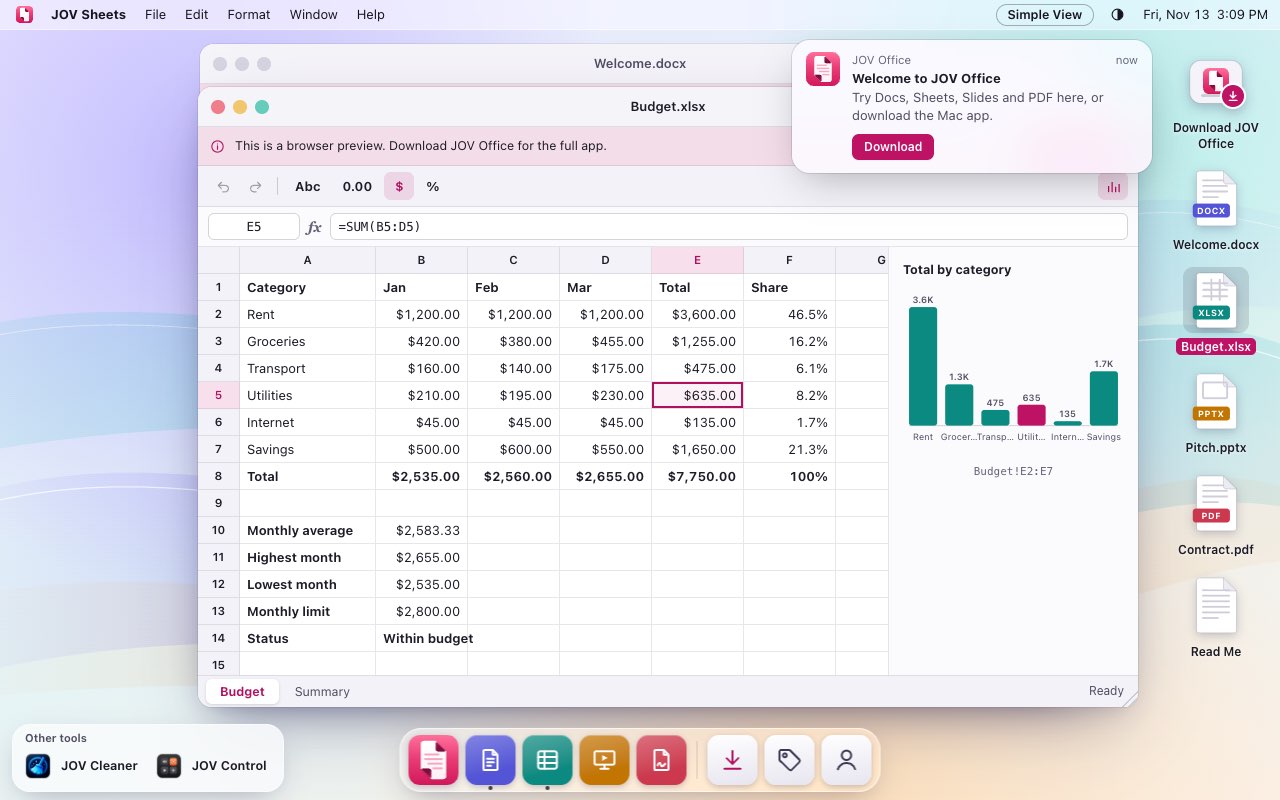
Try the whole app in your browser
The desktop view is a Mac desktop on this page. Open JOV Office from its Dock, then type in a document, fill in a spreadsheet, play a slide show or mark up a PDF.
It runs in your browser, so there is nothing to install first.
Open the Desktop ViewCome back here any time with Simple View in its menu bar.
Edit Word documents and send them back as .docx
Write and edit Word documents with the tools you’d expect to find: fonts and styles, lists, tables, pictures, columns, and headers and footers.
Comments and Track Changes are there when you open a file someone else has worked on.
How to open a Word file on a Mac without Microsoft Office
.docxJOV Office.docx
A change is tracked, Sam’s comment is answered, the change is accepted, and the file stays a .docx.
Work in Excel and CSV files with formulas, charts and filters
Open .xlsx and .xls workbooks. Formulas recalculate as you type, and you can sort, filter, add charts and use AutoSum.
Open a CSV file as a table, edit it, and save it as CSV or as an Excel workbook. A code that starts with zero keeps its zero.
The toolbar is laid out the way Excel’s is, so you don’t have to look for things.
How to open and edit an Excel file on a Mac without Excel
.csvJOV Office.xlsx
A CSV keeps 00087 as 00087, is sorted by Orders, gets a total with AutoSum and is saved as an Excel workbook.
Change your slides and play them full screen
Edit the text, shapes and pictures on a slide, add slides or put them in a different order, then play the presentation full screen.
Open and present a PowerPoint file on a Mac without PowerPoint
.pptxJOV Office.pptx
A new slide gets a title and a shape, its thumbnail is dragged into place, and Play shows it full screen.
Mark up PDFs, fill in forms and combine files
Highlight, add notes, draw and fill in forms, then save a flattened copy to send.
Combine PDFs into one, split one into several files, and rotate or reorder its pages.
How to combine or split PDF files on a Mac
.pdfJOV Office.pdf
Two PDFs are combined into one, a page is dragged into place and a sideways page is turned upright, then it is saved.
What it opens and saves
| Format | Open | Edit | Save |
|---|---|---|---|
| .docx Word document | Yes | Yes | Yes, as .docx |
| .xlsx Excel workbook | Yes | Yes | Yes, as .xlsx |
| .xls Older Excel workbook | Yes | Opens only | No |
| .csv Comma-separated values | Yes | Yes | Yes, as .csv |
| .pptx PowerPoint presentation | Yes | Yes | Yes, as .pptx |
| .pdf PDF | Yes | Highlights, notes, drawings, forms and pages. Not the text of a page.Markup, forms, pages | Yes, as .pdf |
Your files stay on your Mac
Your documents are opened and saved on your Mac, and we never see them. You need an internet connection to sign in, and now and then so the app can check your subscription, but never to open, edit or save a file.
Price
Then $2 a month or $15 a year.
JOV Office is free for 7 days. After that it costs $2 a month or $15 a year, and you can cancel at any time.
When the trial or a subscription ends you can still open, read, print and export your files to PDF.
Install it in about a minute
macOS asks you to allow the app the first time you open it. You only do that once.
-
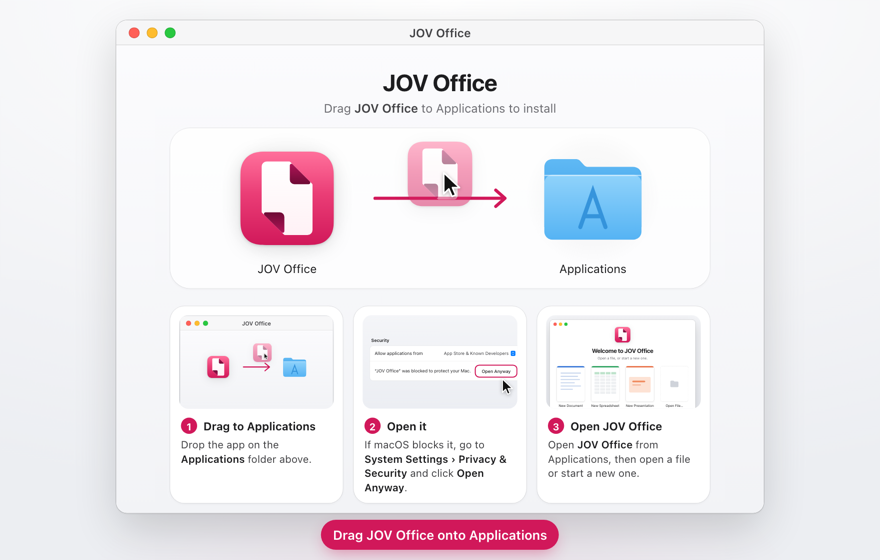
1. Open the file you downloaded and drag JOV Office to Applications.
-
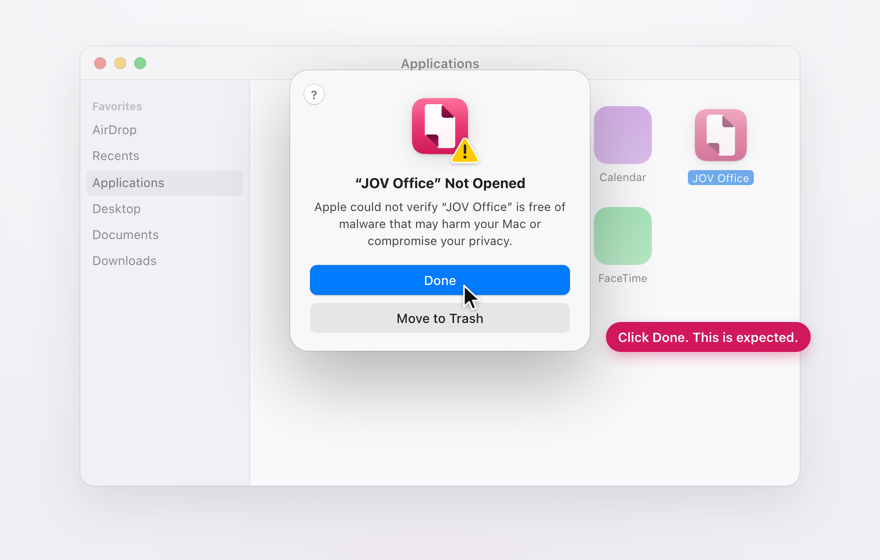
2. Open JOV Office. macOS says it can’t check the app: click Done.
-
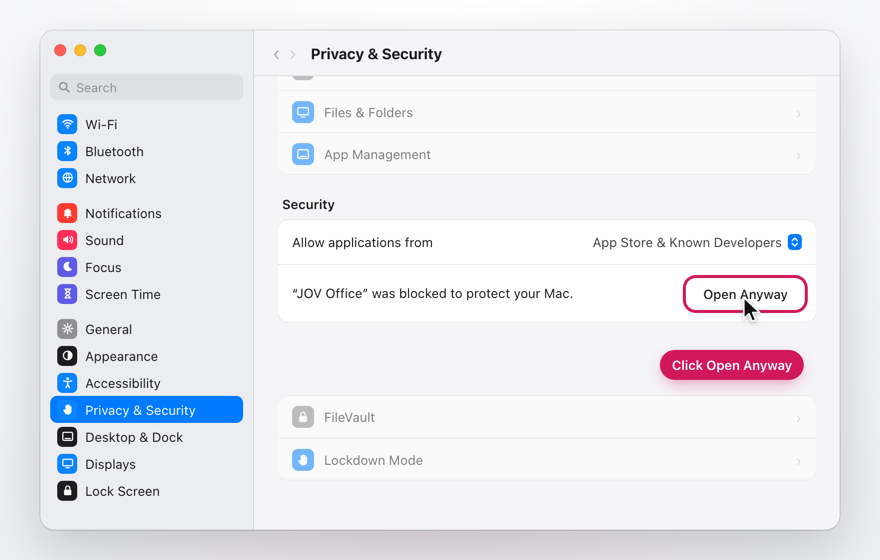
3. In System Settings, open Privacy & Security and click Open Anyway.
-
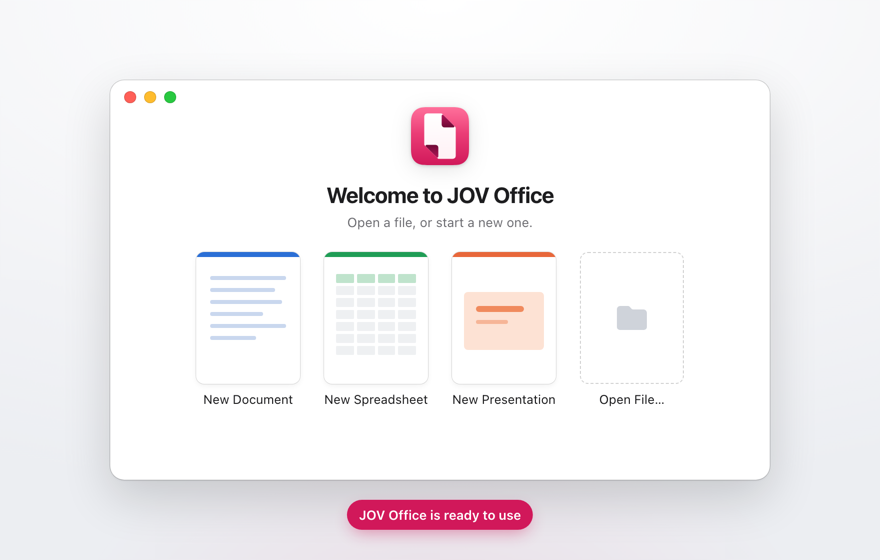
4. JOV Office opens. From now on it opens like any other app.


On macOS 14 Sonoma you can skip step 3: Control-click JOV Office in Applications and choose Open.
Is it free?
It is free for 7 days. After that it costs $2 a month or $15 a year. When the trial or a subscription ends you can still open, read, print and export your files to PDF.
Which files can it open?
Word (.docx), Excel (.xlsx and .xls), CSV, PowerPoint (.pptx) and PDF. Older .xls workbooks open for reading only.
Do I need Microsoft Office or Microsoft 365?
No. JOV Office opens and saves Word, Excel and PowerPoint files itself. You don’t need Microsoft Office on your Mac or a Microsoft account.
Can it open older .doc, .xls or .ppt files?
An .xls workbook opens for reading only. It doesn’t open .doc or .ppt files. Open those in another app and save them as .docx or .pptx first.
Can people with Microsoft Office open what I save?
Yes. Documents, spreadsheets and presentations are saved in their usual formats.
Does it upload my files?
No. Your documents are opened and saved on your Mac and never sent to us. The app sends an anonymous install count and, only if you agree, crash reports. The Privacy Policy lists exactly what.
More QuestionsFewer Questions
Do I need an internet connection?
Only to sign in, and now and then so the app can check your subscription. Opening, editing and saving work without one.
How do I make it the default app for Word files?
In Finder, select a .docx file and press Command-I. Under Open With, choose JOV Office, then click Change All. The same works for .xlsx, .pptx, .csv and .pdf files.
Which Macs and macOS versions does it need?
Any Mac with macOS 14 Sonoma or later.
Does it run on Intel or Apple silicon?
Both. It’s one app that runs natively on Macs with Apple silicon and on Macs with an Intel processor.
Why does macOS say it can’t check the app?
We distribute JOV apps from this website rather than the App Store, and macOS shows that message the first time you open an app from outside the App Store. Click Done, then open System Settings, go to Privacy & Security and click Open Anyway. On macOS 14 Sonoma you can instead Control-click the app in Applications and choose Open. You only do it once.